Inductive Reasoning Meets Deductive Reasoning
This article accompanies my new book, Semantic Webs of Meaning: Building Contextual Knowledge Graphs for Deduction and Integration published by Technics Publications. This is an extension to the topic, Machine Learning Models as Data Products, on page 173. In that topic, iris.py is an example of a Python program that creates an ML model (a k-means cluster created from the iris data set) and converts it into an RDF/turtle file. In this article, I wish to offer an example of creating related graphs in a distributed manner.
I wrote this article such that it can stand on its own, apart from the book. However, I do assume some familiarity with concepts covered in Semantic Webs of Meaning. For example, RDF, Protégé, knowledge graphs, turtle, IRI, and Jena Fuseki. You do not need to be an expert in any of them, but it will help to have a good idea of what the following terms listed in Table 1a and Table 1b mean.
| Term | What you need to know for this article |
|---|---|
| Knowledge graph | A graph of things and the meaningful relationships among them. In this article, the ML model itself becomes one of those things. |
| RDF | The basic subject-predicate-object model used to express the knowledge in the graph. |
| Turtle | A human-readable syntax for writing RDF. The generated files in this exercise are expressed in Turtle. |
| IRI | A globally identifiable name for a resource. A major point of the exercise is linking locally generated concepts to known IRIs in resources such as Wikidata. |
| Class / Individual | A class describes a kind of thing; an individual represents one particular thing. In this article, Machine Learning Model is a class, while the specific Iris KMeans Model created by iris.py is an individual of that class. Very similar to the concept of class and instance in object-oriented programming. |
| Protégé | The ontology editor used here to inspect and visualize the generated RDF. |
| RDFS / OWL | Semantic Web vocabularies used to express things such as classes, subclasses, individuals, and relationships. You do not need much OWL knowledge to follow the exercise, but you will see constructs such as rdfs:seeAlso, owl:Class, and owl:NamedIndividual. |
| SPARQL | The query language for RDF graphs. It becomes important when we query the resulting knowledge graph. |
| Public Shared Resource | External knowledge sources such as Wikidata and DBpedia that provide globally identifiable concepts and relationships. In this article, they are used to connect locally generated ontology entities to shared meaning outside the enterprise knowledge graph. |
| Apache Jena Fuseki | The RDF server used later to load the graph and execute SPARQL queries and Jena rules. |
Machine learning (ML) terms:
| ML term | Meaning here |
|---|---|
| k-means | An algorithm that divides observations into groups, or clusters, based on similarity. |
| Cluster | One of the groups discovered by the k-means model. |
| Centroid | The center of a cluster. In this example, the centroid contains representative sepal and petal measurements. |
| Feature | An input variable used by the ML algorithm, such as sepal length or petal width. |
| Model | The trained result produced by the ML process. Importantly for this article, the model is represented in the knowledge graph as an individual in its own right. |
The value of this exercise is to demonstrate a concept, which is the automatic generation of business rules into an enterprise knowledge graph (EKG). Composing knowledge graphs (KG) is generally a meticulous, tedious process. Any automation (and I describe a few methods in the book), eases that burden. In this case, employing LLMs into this process, but well within the LLM’s comfort zone (no asking it to invent warp drive or Mr. Fusion).
Normally, I would post this exercise on the book’s accompanying GitHub repo. However, given the book’s very recent publication, I decided to post this article here to draw awareness to the book and the repo.
Notes:
- Some of the figures are very busy. For a full view, click on the Figure, and hit the Browser’s back arrow to return to the this article.
- If purchasing the book from the Technics Publications website, use the code TP25 for a 25% discount.
- The file, iris_rdf.rdf, should really be iris_rdf.ttl. This example has been a part of my “presentation” arsenal for years. Back then, that was the file name, and it got into the book with that name.
- In the context of knowledge graphs, ML models are probabilistic, which does contradict the desire for deterministic answers. For the most part, ML models output answers with probabilities, but they will still be the same answer and probability for the same input.
- Update Sept 14, 2026: This is the first part of a series, Inductive Meets Deductive:
- 2. Jena (Fuseki) Rules for Iris,
- 3. Web of Functions (Transformations)
- 4. Re-linking retrained models (~October 2026).
- 5. Implementing decision forests (~October 2026).
- 6. Implementing an ML model trained on the association/arules algorithm (~November 2026).
- 7. Implementing regression, neural networks, and FFT models as rich properties (~December 2026).
Business Rules in the Knowledge Graph
ML models could be thought of as business rules, or at least potential business rules. For example, a business rule might be to offer a discount to a customer based on the relationship with customer, the severity of the issue, whether it was our mistake, etc. We can plug in “great customer”, “critical”, and “our fault” into a function and out pops a percentage discount. But determining those three inputs are each business rules themselves. What are the criteria for a great customer, a critical issue, and whether a problem was our fault?
Business rules affect a business, therefore ML models and all forms of business rules should be incorporated into an EKG—a “composite” (often consisting of a number of independently created pieces) KG encoding anything related to our business.
Before looking at iris.py, there is an important KG modeling concept to discuss—classes and instances/individuals. A class describes a kind of thing, an individual represents a particular thing. For example, Machine Learning Model is a class, while the particular Iris k-means model created by iris.py is an individual of that class. There may be many machine-learning models, and even many models created using k-means, but this trained model is one specific thing with its own training data, parameters, learned clusters, provenance, and other properties.
One important point about iris.py is that its primary output is not just a k-means model of the Iris dataset itself. It is intended to say things about a particular machine-learning model created from that dataset and link it to known resources. The ML model is therefore represented as an individual in the KG, much as a particular company, person, building, or software system would be represented as an individual.
Modeling the trained model as an individual gives us a node to which all of that knowledge can be attached. The algorithm, dataset, model file, learned clusters, metrics, dates, and other information can describe or relate to this particular model rather than describing machine-learning models in general.
That gives us a place to attach knowledge about the model: which algorithm produced it, which features were used, which dataset it was trained from, when it was created, what clusters it discovered, the centroids of those clusters, evaluation information, and other provenance or model metadata. The learned clusters can then be related back to this specific model rather than existing as unexplained concepts floating in the graph.
This is important because the RDF is not trying to replace the executable ML model. It is creating a semantic representation of the model and what the model learned. Once represented this way, the model becomes another thing the KG can describe, relate to other things, query, reason about, and connect to shared knowledge outside the local system.
The Use Case
Idaho Plant Rescue (IPR) saves plants discarded from landscape renovations. The species of each rescued plant must be determined in order to ensure proper adoption. To promote consistency and accuracy, IPR employs an array of ML models, each tasked with species identification by genus.
For this exercise, we’re focusing on the iris genus. The goal is to encode the properties of the model into IPR’s Enterprise Knowledge Graph. That way, anyone can see how iris species are determined at IPR. This knowledge is then matched to well-known Internationalized Resource Identifiers (IRI), which semantically links this knowledge to other knowledge graphs.
Performing the identification is another issue. Please see Appendix E – Clustering Models for an idea of how the iris k-means model could be implemented in a KG for querying (executing the model to make a prediction) using SWRL. And there is an exercise using Jena (Fuseki) Rules for Iris.
Note that this article seems to overlap with Embedding Machine Learning Models into Knowledge Graphs, but the message of that article is that ML models are a type of “rich property” (see, Appendix F – Rich Properties) that explain something beyond what we can readily express in RDF. Think: a picture is worth a thousand words. This article is about mapping the pieces of an ML model (features, output, etc.) into a KG, which describes the gist of what they are.
The Data
We start with a Turtle encoding of a k-means model created by a Python script named iris.py:
- Uses the famous iris data set to generate an ML model using the k-means algorithm.
- That is serialized into iris_k-means_model.pkl.
- Generates a turtle file, iris_rdf.rdf, that reflects the k-means model.
Per #1, Table 2 lists the first few rows from the iris data set (Fisher’s Iris data (UCI / scikit-learn ordering):
| sepal length (cm) | sepal width (cm) | petal length (cm) | petal width (cm) | species |
|---|---|---|---|---|
| 5.1 | 3.5 | 1.4 | 0.2 | setosa |
| 4.9 | 3.0 | 1.4 | 0.2 | setosa |
| 4.7 | 3.2 | 1.3 | 0.2 | setosa |
| 4.6 | 3.1 | 1.5 | 0.2 | setosa |
| 5.0 | 3.6 | 1.4 | 0.2 | setosa |
iris.py is actually coded by an LLM from a prompt and the iris data set. That’s just one relatively meaningless example. At scale, the data sets and requirements will constantly shift. Meaning, there will be a need to create and maintain dozens, if not hundreds of Python scripts. So the assistance from LLMs is crucial.
The Main Idea
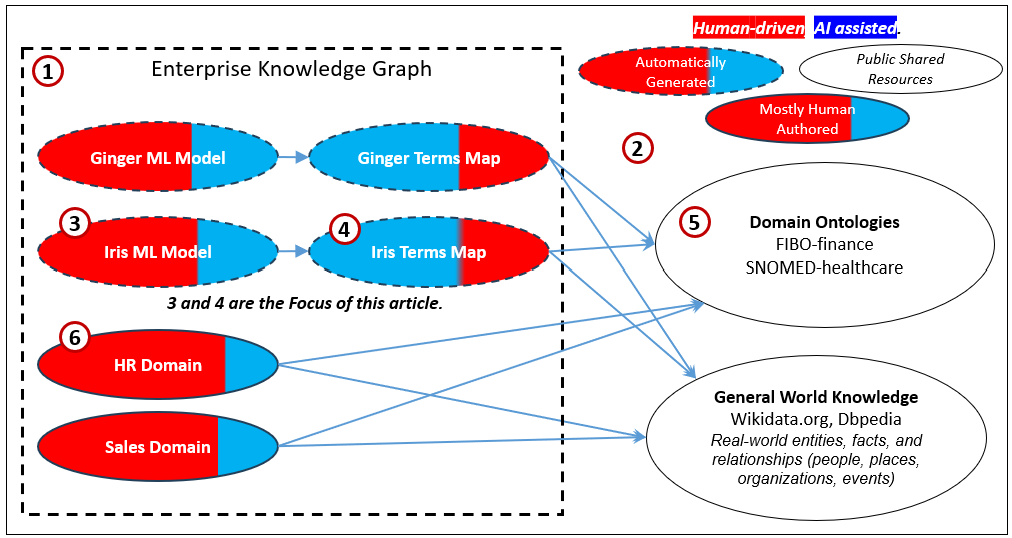
Figure 1 illustrates the main idea of what we’re after:
- IPR is building an enterprise knowledge graph. It is composed of automatically generated (or at least mostly automatic) KG components.
- The world is filled with shared resources such as Wikidata, DBpedia, and domain ontologies such as FIBO and SNOMED.
- An ML model is created and encoded into RDF/OWL/Turtle. The same goes for a similar model for identifying ginger species. The human-driven part includes the data scientist work that might go into developing the data set and/or generating the model. Alternatively, AutoML would contribute towards “AI-assisted” work.
- Terms used in the ML model are mapped to the shared resources (2).
- The term map (4) points to items in the shared resources. These are IRI.
- Domain-level KGs (HR and Sales) are mostly human-authored and probably AI-assisted. Ideally, they are authored with the IRI pointing to public shared resources, so there hopefully isn’t a need for mapping.
The Process Overview
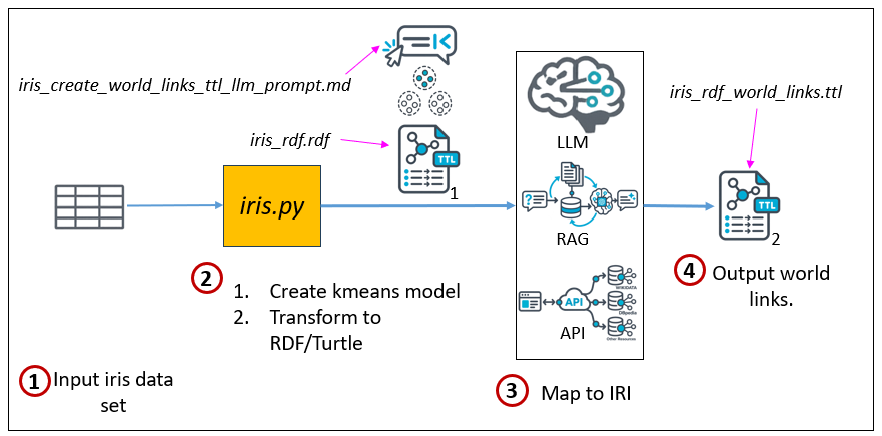
Figure 2 outlines the process as we’re covering it in this article.
- The iris data set is fed into the iris.py program.
- The iris.py program discovers clusters within the iris data set, and creates a turtle file of the metadata.
- The turtle file and an LLM prompt of instructions are submitted to an LLM to link resources to IRI.
- The result is returned as a turtle file, a supplement to the turtle file generated by iris.py.
iris.py handles quite a bit, but it is specialized for this particular dataset and example. It discovers clusters based on the sepal and petal measurements. The somewhat coerced part is that it then names those clusters using the species that happen to be dominant within them. That happens to work out nicely with the Iris dataset, since the clusters correspond closely to the known species. You might think of that part as the model validating the existing species designations rather than independently discovering and naming them.
In a more automated process, the cluster name would not need to come from a preexisting label such as species. A reasonable default would be to name the cluster from whatever characteristic distinguishes it most strongly from the others. That might be a dominant categorical feature, an unusually high or low metric, or some combination of attributes that most clearly describes the cluster. The name would therefore be a generated shorthand for the most noticeable pattern in the cluster, not necessarily a formal semantic classification. It could later be refined, mapped to a known concept, or replaced during human review.
Alternatively, is it possible to ask an LLM to directly do everything that iris.py does? Yes. However, relying on an LLM to generate the iris_rdf.rdf file directly is currently beyond the level of reliability of LLMs, at the time of writing. But an LLM can generate a starting version of the python and validate/test it in a human-supervised manner. That’s probably what the LLM will do anyway if asked to create the file.
Figure 3 illustrates a more robust process, which I intend to cover in the future.
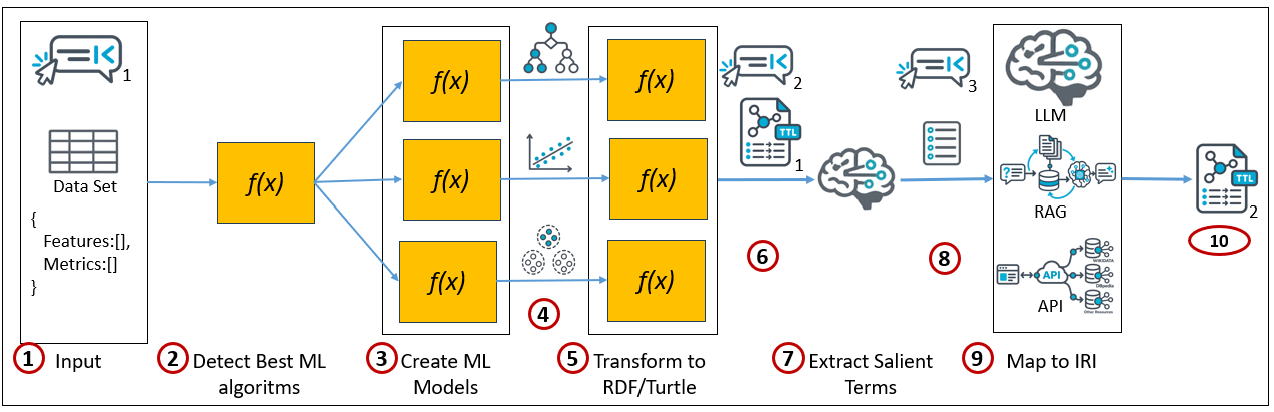
Here are the descriptions of the items in Figure 2:
- Input — Supply the prompt, source dataset, and configuration identifying which columns are features and which are metrics or targets.
- Detect Best ML Algorithms — Inspect the configured data—feature types, ranges, distributions, cardinality, target characteristics, and other properties—to determine which ML algorithms are appropriate candidates.
- Create ML Models — Run the corresponding ML functions to train, test, validate, and evaluate the candidate models, including the MLflow-like lifecycle needed to produce usable model artifacts.
- ML Model — Produce the selected trained model and its relevant learned structure, parameters, metrics, and other metadata needed for semantic representation.
- Transform to RDF/Turtle — Pass the model to its corresponding transformation function, which expresses the learned model and its important properties as RDF/Turtle. A script such as
iris.pymay perform both model creation and this transformation. - Model Turtle + Prompt — Combine the generated Turtle representation with a prompt that tells the LLM what kinds of concepts or terms should be identified for connection to external knowledge.
- Note that as of February 2026, LLMs such as Grok and ChatGPT were fairly unreliable as far as matching terms to IRI. I wrote about that in my blog, Explorer Subgraph—The Dynamic Cartography of Relation Space. LLM vs Chat Window. Although the Chat access to Grok and ChatGPT appear much better at it since then, it’s still not nearly accurate enough for production. I advise the method I propose in the blog for production.
- Extract Salient Terms — Use the LLM to examine the model semantics and identify meaningful domain terms—classes, properties, concepts, measurements, entities, and other terms worth grounding in shared knowledge.
- Candidate Terms — Produce the distilled list of salient terms that should be resolved against external semantic resources.
- Map to IRIs — Use RAG/API access to resources such as Wikidata, DBpedia, and other shared knowledge sources to find appropriate IRIs for the candidate terms, using context to disambiguate competing possibilities.
- World-Linked Turtle — Generate the enriched Turtle file containing the original model semantics plus links to external IRIs, connecting the locally learned ML model to the wider Semantic Web.
Steps 2–3 are analogous to an AutoML process that determines suitable machine-learning algorithms, trains and validates candidate models, compares their performance, and produces the selected model artifacts. MLflow or a similar experiment-management system could be used underneath this process to track runs, metrics, parameters, and model versions.
Manually Authored Rules
As mentioned earlier, a deployed ML model used to make a business decision can be thought of as a business rule. The difference is how that rule is created. For purposes of this comparison, think of SWRL and Jena rules as manually authored rules: someone explicitly writes the equivalent of if these conditions are true, then assert this conclusion. Such rules can also be generated automatically, as demonstrated by the linked Jena Rules exercise.
An ML model arrives at its decision logic by learning from data instead (an inductive process). Its clusters, coefficients, branches, or other learned parameters play the role of the conditions in a manually written rule. Both forms can therefore belong in a knowledge graph: one records decision logic written by people, while the other records decision logic learned from data.
Viewing the ML Model as a Graph
As we do in the book, we’ll use Stanford Protégé to render the sample graph.
Figure 4 shows the graph view of the turtle output of iris.py, iris_rdf.rdf. It’s fairly simple, a mini taxonomy of iris species (1) and classes for ML concepts (2).
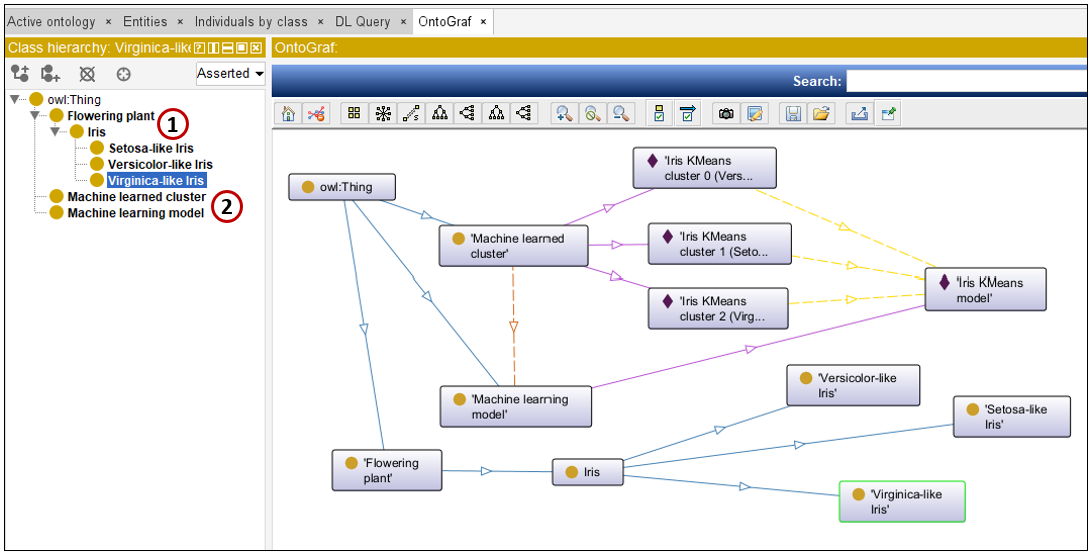
Figure 5 looks at the Iris class (1), which is a subclass of a “Flowering Plant” (2). Setosa, Versicolor, and Virginica are three species of the genus, Iris (3).
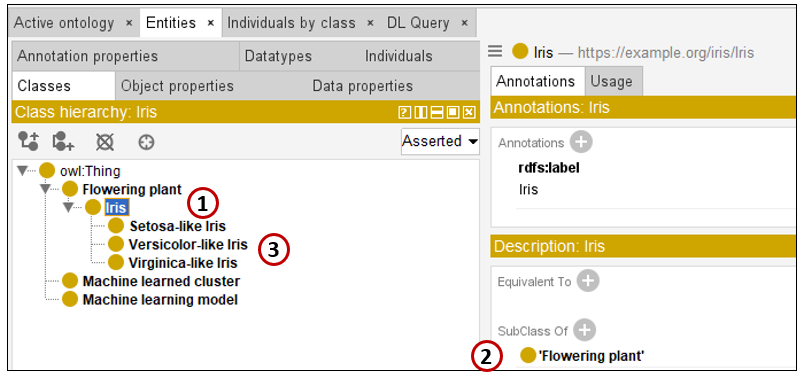
Figure 6 highlights a class for ML Models. We’ll see in a bit (Figure 8) that this is used to say that the k-means model we created (named “Iris K-means Model”) “is a” ML model.
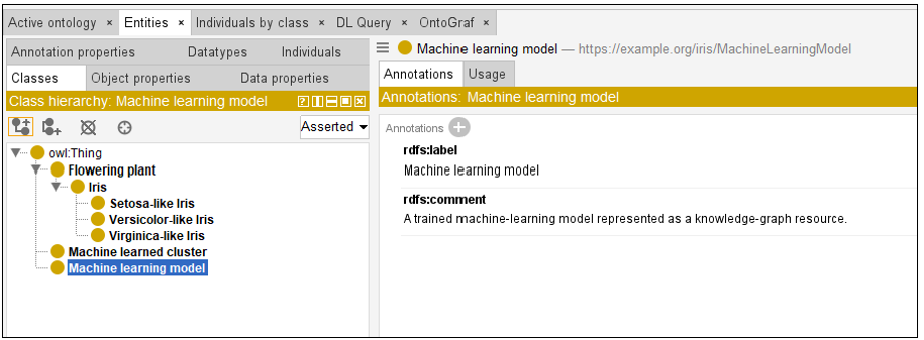
Figure 7 is a class for Machine learned cluster (1). A “cluster” is what is discovered by the k-means algorithm applied to the iris dataset. We see that it’s not a subclass of anything (2), but there are three “instances” of it (3).
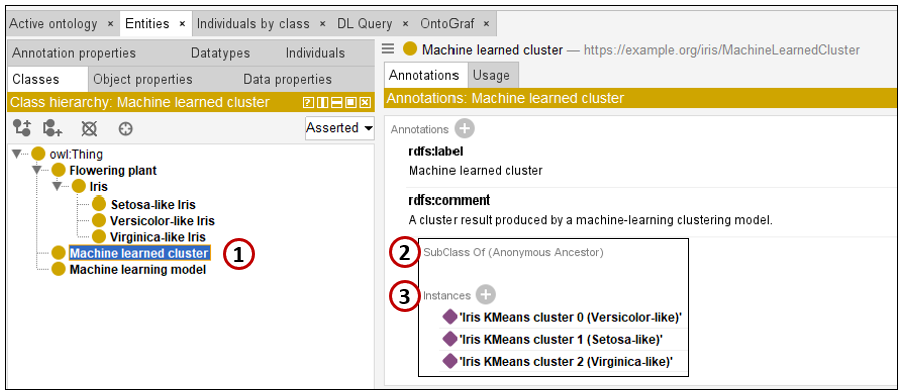
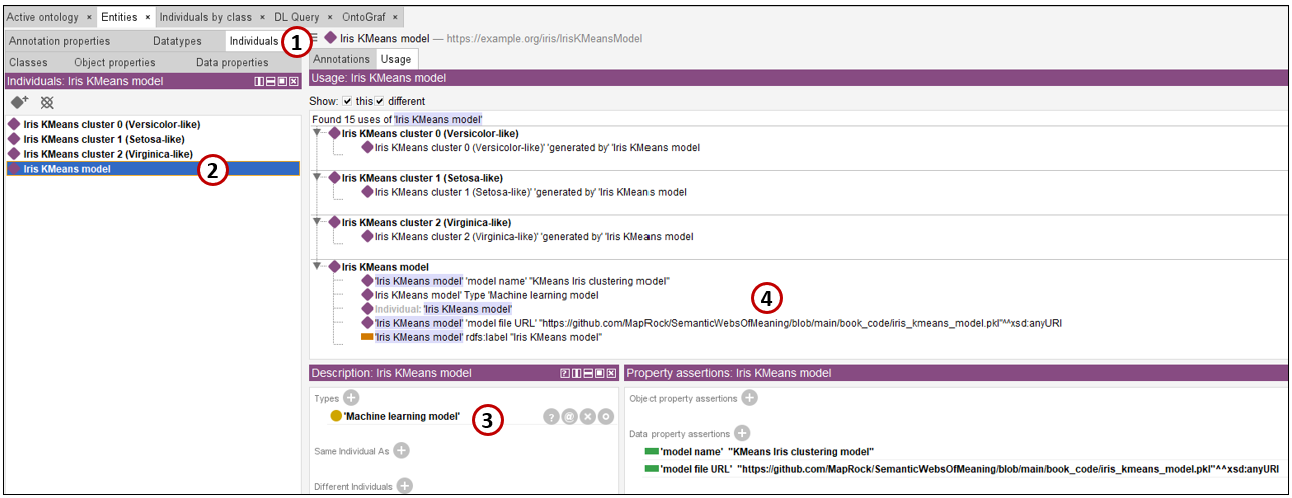
Figure 8 shows “individuals”, in this case, the kmeans model.
- Note that we switched from the Classes tab to the Individuals tab.
- Selected the “Iris KMeans Model” individual. This refers to the model created from the k-means algorithm.
- This states: “Iris KMeans Model” is a “Machine Learning Model”.
- The name of the actual kmeans model, the pickle file.
Slowly Changing Entity (SCE)
This node of Figure 8, named “Iris KMeans Model“, is the hub of the ML model. It represents the model as a continuing entity and connects it to its features, outputs, algorithm, and learned clusters. However, the contents of the model are not necessarily permanent. If the model is trained again using newer data, the centroids and even the meaning of its clusters may change.
This creates the same historical problem addressed by a slowly changing dimension in a data warehouse. We could simply replace the old cluster values, which would be equivalent to SCD Type 1. But then we would lose the ability to reconstruct why the model made a particular decision in the past. A flower assigned to Cluster 2 last year might not be assigned to the current Cluster 2, because the cluster’s centroid may have moved after retraining.
For that reason, the learned details should be handled more like SCD Type 2. Each cluster should have a versioned identifier, such as IrisCluster_1_v1 and IrisCluster_1_v2. The earlier cluster remains in the graph with its effective and expiration dates, while the new version is added with a new effective date. The main Iris KMeans Model node remains the stable hub but records or points to the current model version. Any classification or other decision should also reference the specific version that produced it. This allows the graph to describe the model as it exists now while preserving the exact model state that explains decisions made in the past.
The sample RDF shows only the current trained version. In a production graph, each retraining would create a model-version individual and its corresponding versioned clusters beneath the stable Iris KMeans Model hub.
The Model Elements
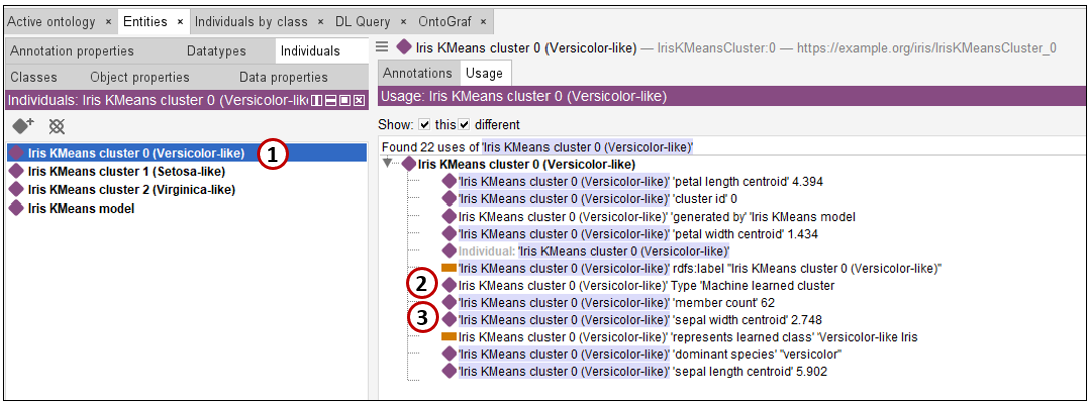
Figure 9 shows an example of one of the clusters that belong to the “Iris KMeans Model” (Figure 8).
- Selected “cluster 0”, the one that happens to match versicolor, therefore it’s named after that species.
- Says: “Iris KMeans cluster 0” is a “Machine learned cluster” (see Figure 7).
- An example of one of the parameters of the cluster: the centroid sepal width is 2.748.
Linking to the Rest of the World
Most English speakers know what petals are, or at least they think they do—there are many examples of what look like petals but are actually bracts. Fewer might know what a sepal is. Petals vs. bracts doesn’t matter in casual conversation because we generally know what the other means and the difference generally doesn’t matter. That is, unless you’re a biologist, horticulturist, an AI, or like the average redditor on YouTube (hilarious).
The goal is to map ontology entities (classes, individuals, properties) in the iris_rdf.rdf file to well-known Internationalized Resource Identifiers (IRI)—for example, from Wikidata and Dbpedia. That is a tedious but conceptually straightforward process, one that isn’t readily reducible to deterministic code (Python, Java, C++, etc.). It’s just the sort of thing AI can help with, even though the results still need to be validated.
For that task, I’ve employed Grok (“Expert” mode), using a new private chat (so that it doesn’t leverage anything from our past conversations). As the prompt, I provided Grok with these two files listed in Table 3:
| File | Role in the process |
|---|---|
iris_rdf.rdf | Semantic representation of the trained Iris K-Means model. It describes the model, its learned clusters, centroid values, model provenance, and the learned Iris classes that later stages can enrich with external meaning. |
iris_create_world_links_ttl_llm_prompt.md | Prompt supplied to the LLM to examine the model RDF, identify salient domain terms, and create the world-link Turtle that connects those local concepts to external IRIs and shared knowledge resources such as Wikidata. |
The main output from Grok, is the file, iris_rdf_world_links.ttl. This file contains the RDF equivalent of what is shown in Table 4. It did a surprisingly good job for this one-shot exercise. Table 4 lists the IRI it mapped for ontology entities it deemed useful to know:
| Concept in source | Linked from | Wikidata |
|---|---|---|
| Flowering plant / angiosperms | ex:FloweringPlant | Q25314 |
| Iris (plant genus) | ex:Iris | Q156901 |
| Iris setosa | ex:IrisCluster_SetosaLike, ex:IrisKMeansCluster_1 | Q894226 |
| Iris versicolor | ex:IrisCluster_VersicolorLike, ex:IrisKMeansCluster_0 | Q164844 |
| Iris virginica | ex:IrisCluster_VirginicaLike, ex:IrisKMeansCluster_2 | Q7934335 |
| Petal | ex:petalLengthCentroid, ex:petalWidthCentroid | Q107412 |
| Sepal | ex:sepalLengthCentroid, ex:sepalWidthCentroid | Q107216 |
| Machine learning | ex:MachineLearningModel | Q2539 |
| k-means clustering | ex:IrisKMeansModel, world ontology | Q310401 |
| Iris flower data set | ex:IrisKMeansModel, world ontology | Q4203254 |
It’s important to note that these resource terms were derived from the iris_rdf.rdf file, which happens to offer many clues, such as the species names and comments. That inline documentation was provided by the iris.py program. So, you will need to provide some extra commentary in case your file doesn’t contain that sort of commentary.
Now that we have the iris_rdf_world_links.ttl file, we can import it alongside iris_rdf.rdf and see what it adds to the graph.
Figure 10 shows the import of iris_rdf_world_links.ttl into the ontology already containing iris_rdf.rdf. The world-link file is kept separate from the original model RDF, but Protégé can load and merge the two together. This lets us add links to outside resources without any changes to the Turtle originally generated by iris.py.
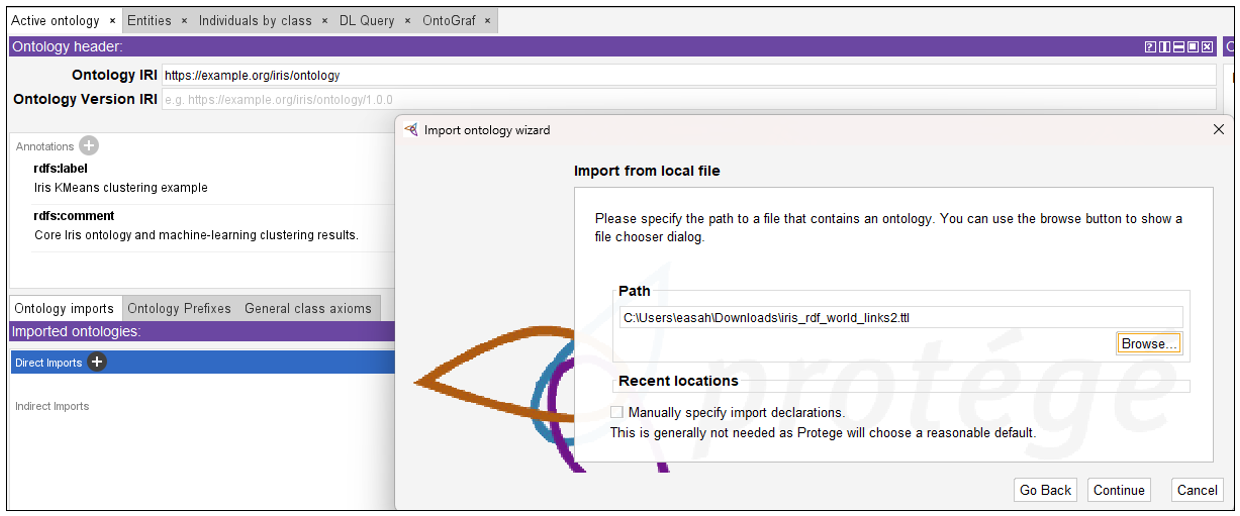
Figure 11 shows the result of the import. The world-link ontology now appears under Direct Imports, along with its ontology IRI and the location of the Turtle file. The assertions from iris_rdf_world_links.ttl are now available alongside those from iris_rdf.rdf.
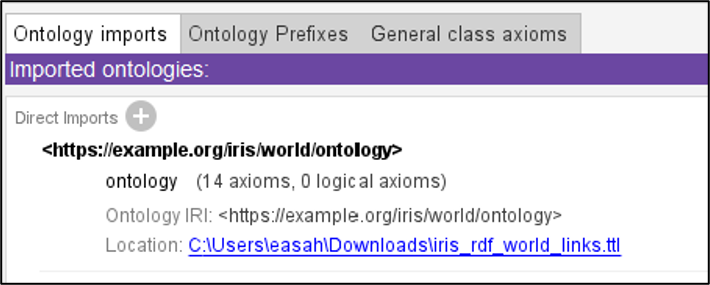
Figure 12 returns to the Iris class that we saw earlier in Figure 5. The original iris_rdf.rdf file says that Iris is a class and a subclass of Flowering Plant. The imported iris_rdf_world_links.ttl file adds an rdfs:seeAlso link to Wikidata Q156901, the entry for the Iris genus. The local class is now connected to a concept outside our little Iris knowledge graph.
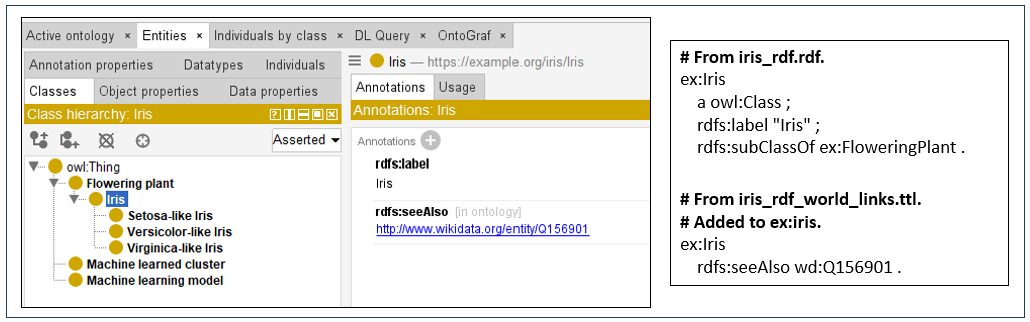
Figure 13 shows the same thing for Setosa-like Iris. The class and its description come from iris_rdf.rdf, while the world-link file adds an rdfs:seeAlso link to Wikidata Q894226, the entry for Iris setosa. We have not replaced our local concept; we have connected it to shared knowledge about the species.
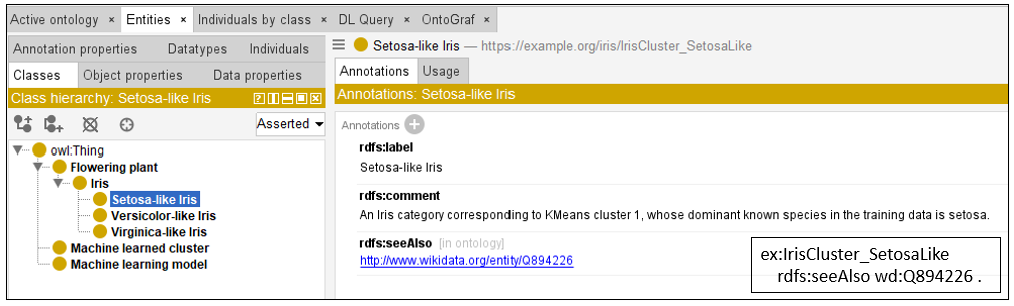
Figure 14 shows the enrichment of the actual Iris KMeans Model individual. iris_rdf.rdf describes the local model and identifies it as a Machine Learning Model. The world-link file adds links to Wikidata for k-means clustering (Q310401) and the Iris flower dataset (Q4203254). We can therefore move from this particular trained model to information about both the algorithm that produced it and the dataset from which it was created.
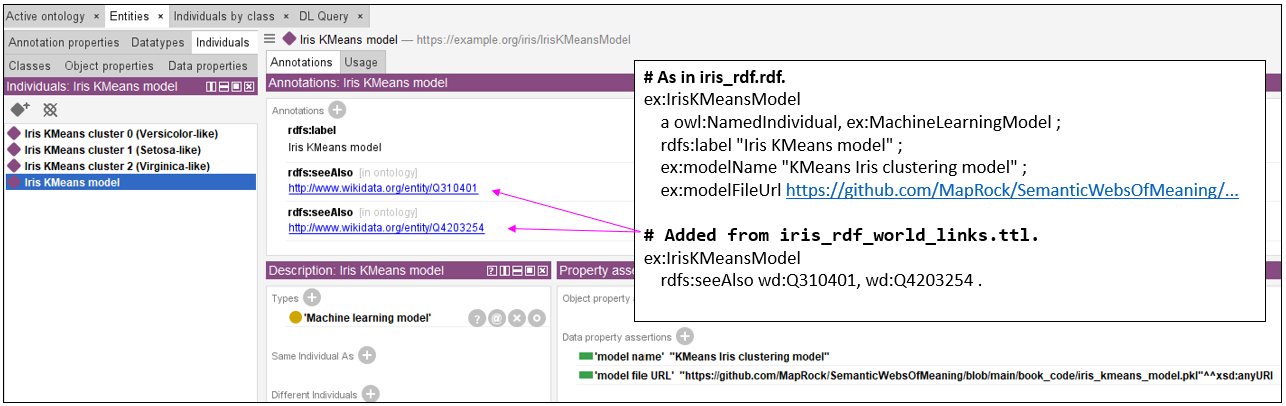
Figure 15 returns to KMeans cluster 0, the cluster that predominantly corresponds to Versicolor. The information on the left and right comes from the original model RDF: the cluster identity, centroid values, dominant species, and relationship to the learned Versicolor-like class. The world-link file adds an rdfs:seeAlso link to Wikidata Q164844 for Iris versicolor. The learned result of the ML model is therefore connected to knowledge about the real-world species it represents.
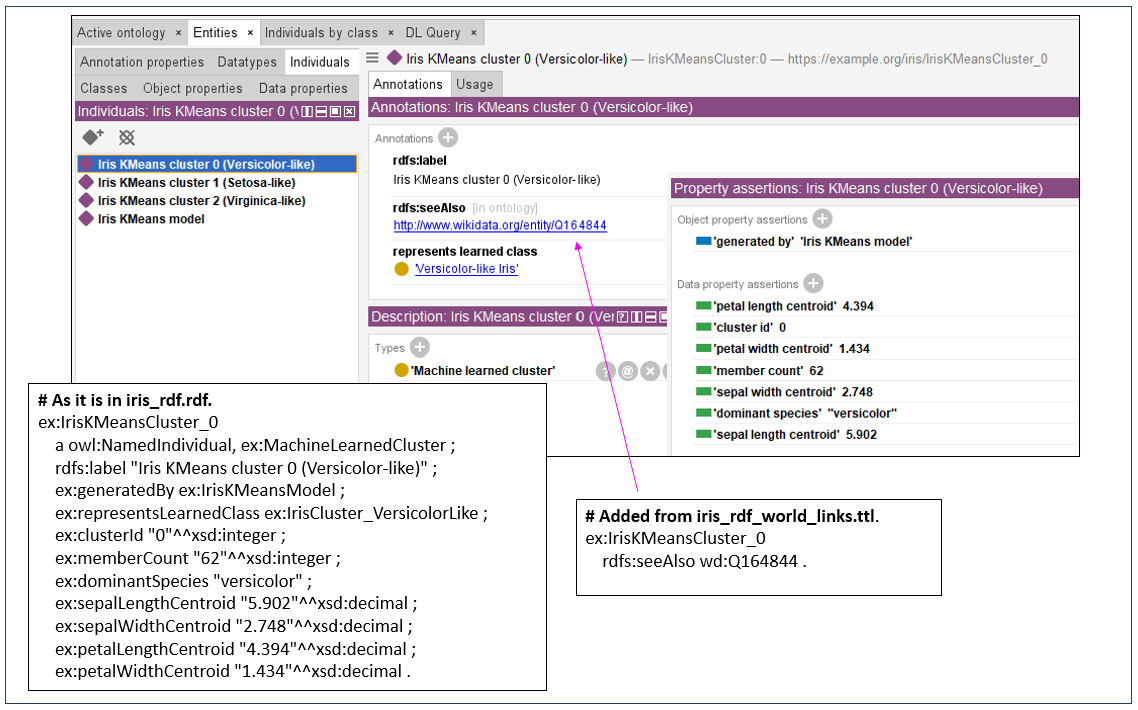
Cluster 0 states:
This cluster represents a group of 62 Iris observations that the k-means model found to be similar to one another. The center of the cluster—the centroid—has a sepal length of about 5.90 cm, a sepal width of 2.75 cm, a petal length of 4.39 cm, and a petal width of 1.43 cm. Most of the flowers in this cluster are Iris versicolor, so the cluster is labeled “Versicolor-like.” The important point is that the model discovered the grouping from the measurements; the species name is then used as a convenient description of what predominantly ended up in that cluster.
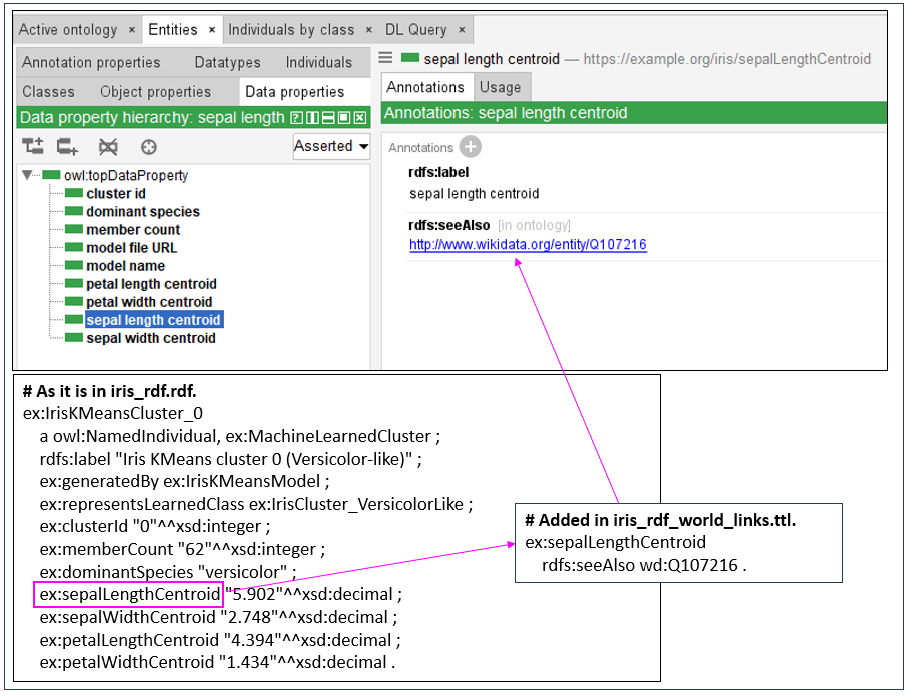
Figure 16 shows that the same approach can be applied to properties, not just classes and individuals. The original RDF uses sepalLengthCentroid to describe one of the measurements learned by the k-means model. The world-link file adds an rdfs:seeAlso link from that property to Wikidata Q107216 for sepal. This gives outside meaning to what would otherwise be merely a locally named data property.
Prediction Is Not Understanding
At this point, I’d like to offer a cautious reminder about ML models in this context of inclusion in an EKG. ML models can be extremely good at prediction without containing much understanding of how they make their predictions and what they are predicting (ex. What made irises speciate with different petal and sepal lengths?). Most ML models are based on statistical relationships in the data. In this iris example, the k-means model knows that certain combinations of sepal and petal measurements tend to occur together. That is enough to place a new observation into a cluster and make a useful species prediction. But the model itself does not know what a sepal is, why those measurements distinguish one species from another, how an Iris fits into botanical taxonomy, or what other relationships might matter outside the four features supplied to the model.
What is nice about ML models is that they discover and exploit patterns without requiring us to explicitly encode everything we know about the subject. But it also means that a successful prediction should not be confused with understanding. The model’s view of the world is largely bounded by its training data, selected features, learned parameters, and objective. The good news is we can say that ML models usually provide insight towards understanding.
A well-constructed KG can carry a much broader context. It can say that a sepal is part of a flower, that Iris is a genus of flowering plants, that Iris versicolor is a species within that genus, that measurements describe particular botanical structures, and then continue outward through other relationships in the KG. Those relationships can cascade through many levels of semantics far beyond the relatively small set of features used by the ML model.
A KG does not magically provide complete understanding either. But because it can explicitly connect a result to a much larger web of meaning, it can get us closer to conveying why something means what it means, rather than merely saying that a pattern predicts it. That is another reason for incorporating ML models into the EKG—the prediction can become connected to the broader context in which that prediction has meaning.
Conclusion
The larger point of this exercise isn’t the Iris data set or even k-means. It is the automatic generation of knowledge into a knowledge graph—a tremendously laborious and ongoing process.
A machine-learning model is particularly interesting because it represents something the machine learned from data. If that model is going to influence decisions in the business, then in an important sense it has become a business rule. It shouldn’t sit off to the side as an unexplained pickle file. The enterprise knowledge graph should know that the model exists, what it was trained from, what it learned, and how its concepts relate to the rest of what the enterprise knows.
And as much of that process as possible should be automated.
My general rule is that if a procedure can be programmed reliably, it should be programmed. There is no reason to risk “misunderstanding” and/or repeatedly ask an LLM to perform deterministic work that ordinary software can perform faster, cheaper, and more predictably. That’s what “machines” do. That is why iris.py creates the model and generates its basic RDF representation.
The LLM is useful where conventional programming becomes cumbersome. In this example, that is examining the semantic clues in the generated RDF, deciding which concepts are worth linking, finding candidate resources in places such as Wikidata, and producing the supplemental Turtle containing those links. That is a fuzzy, contextual task with enough variation that encoding every possibility procedurally would be difficult. At least for now, an LLM can serve almost like another function in the pipeline for that sort of work. The article already demonstrates this division of labor: ordinary code produces the model and its RDF, while the LLM assists with mapping the resulting concepts to outside IRIs.
That does not mean blindly accepting the LLM’s output. The mappings still require human validation. Automation moves the human away from doing all of the tedious work manually and toward reviewing the parts where judgment is actually needed.
The small demonstration here packages several steps together because that makes the idea easier to see. A production implementation should be much more loosely coupled. Model discovery and training, model management, RDF generation, semantic term extraction, IRI resolution, validation, and publication to the knowledge graph can each be separate components. Systems such as MLflow could manage the model lifecycle underneath that process.
The result is not merely documentation about an ML model. It is a way for knowledge discovered by machines to become part of the enterprise’s explicit knowledge—and, increasingly, for that process of adding knowledge to happen automatically.
The next step is to see how this model can be implemented to perform its task, not just encode knowledge of the model. As mentioned earlier please see these two articles on how to implement the ML models directly into the EKG and how to query it:
- Appendix E – Clustering Models for an idea of how the iris k-means model could be implemented in a KG for querying (executing the model to make a prediction) using SWRL.
- Jena (Fuseki) Rules for Iris for a tutorial on applying the k-means model into the Jena Fuseki graph DB using Jena Rules.
Lastly, consider the thought of implementing rules as suggested by my Prolog series.


3 thoughts on “Machine Learning Models in Knowledge Graphs”